 TB Crypt Auto-Explorer
The Total Battle auto crypt botLet Carter do the crypts.
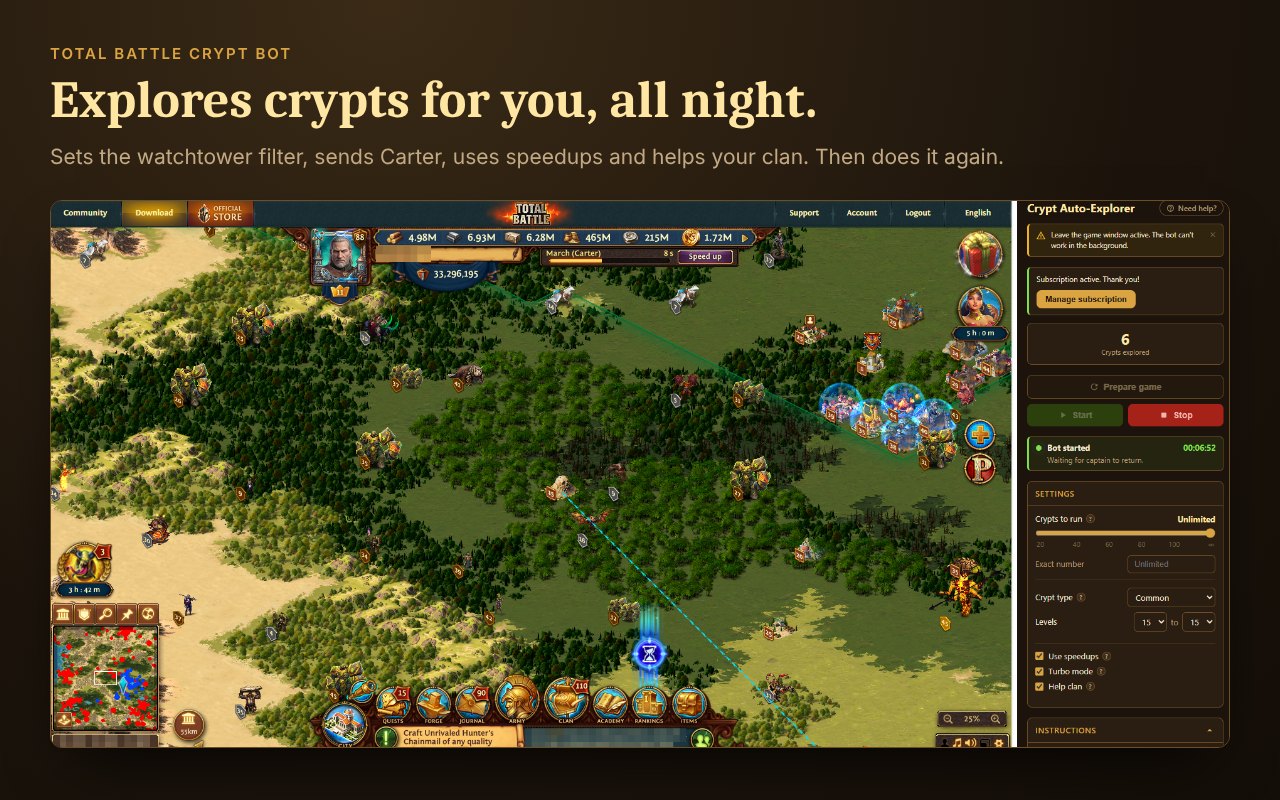
An autocrypter for the browser version of Total Battle. This Chrome and Edge extension sets the watchtower filter, finds a crypt, sends Carter, uses speedups and does it again, for as long as you let it run. No calibration and no separate program to install.
On your phone? The bot runs in Chrome or Edge on a computer, and you keep playing on your phone when the bot is off. Send yourself the link and install it there.
Send the link to my computer1 hour free to try. No card needed. Rated 4.8/5 by 5 reviewers on the Chrome Web Store.
No calibration, no separate program
Add it to Chrome or Edge, press Prepare game and Start. No screen resolution or scaling to change, no program to install, no clicks to record.
Clan chests while you sleep
Up to about 188 crypts an hour with three captains, and every one puts a chest in your clan's list. Clan targets stop being a weekend chore.
Play on your phone, your PC does the crypts
Most of our players play on their phone. When you put it down, start the bot on the same account in Chrome and it runs crypts while you sleep or work.
Farm the set you want
Pick exactly which crypts to explore, and let the crafting planner tell you which ones your next set needs.
“Tested this myself, very good, no calibration needed, works on browser. And if you need support the guy is super friendly. And not pricy!”
What it does
- Sets the filter for you
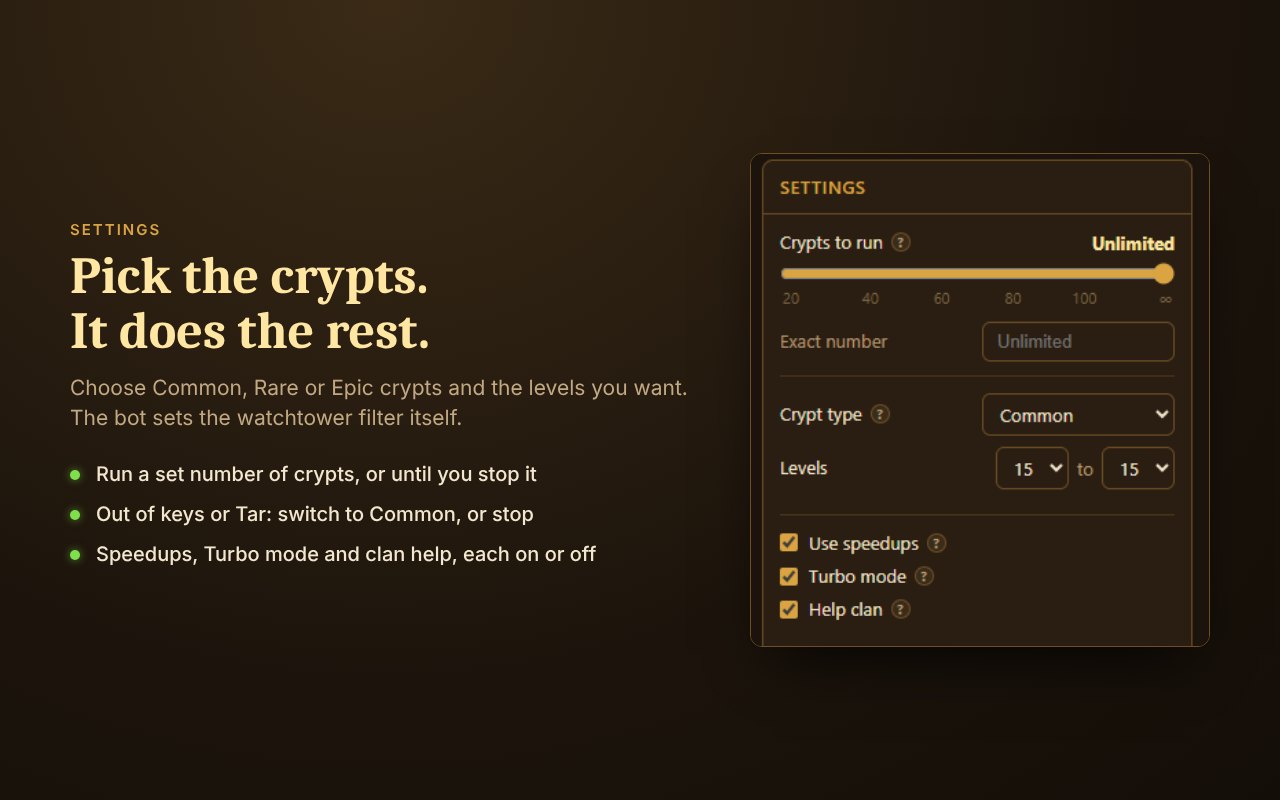
- Pick Common, Rare, Epic or Others and the levels you want. The bot opens the watchtower, sets the buttons and the level slider, and checks that they really ended up right.
- Sends Carter, again and again
- Finds a crypt on the map, opens it and sends Carter to explore. Then it waits for him to come back and picks the next one.
- Three captains at once
- In 3 Captains mode up to three captains explore crypts at the same time. As soon as one is home, he is sent to the next crypt and his march is sped up. Two captains are never sent to the same crypt.
- Uses your speedups
- Speeds up Carter's march as far as the game allows. Turbo mode does it faster, with fewer pauses.
- Opens Rare crypts
- Uses a Dragon Key to open Rare crypts. When the keys or the Tar run out it stops, or carries on with Common crypts if you choose that. It never buys Tar or gems. Opening a crypt uses the Tar you already have in the game.
- Shows what it did
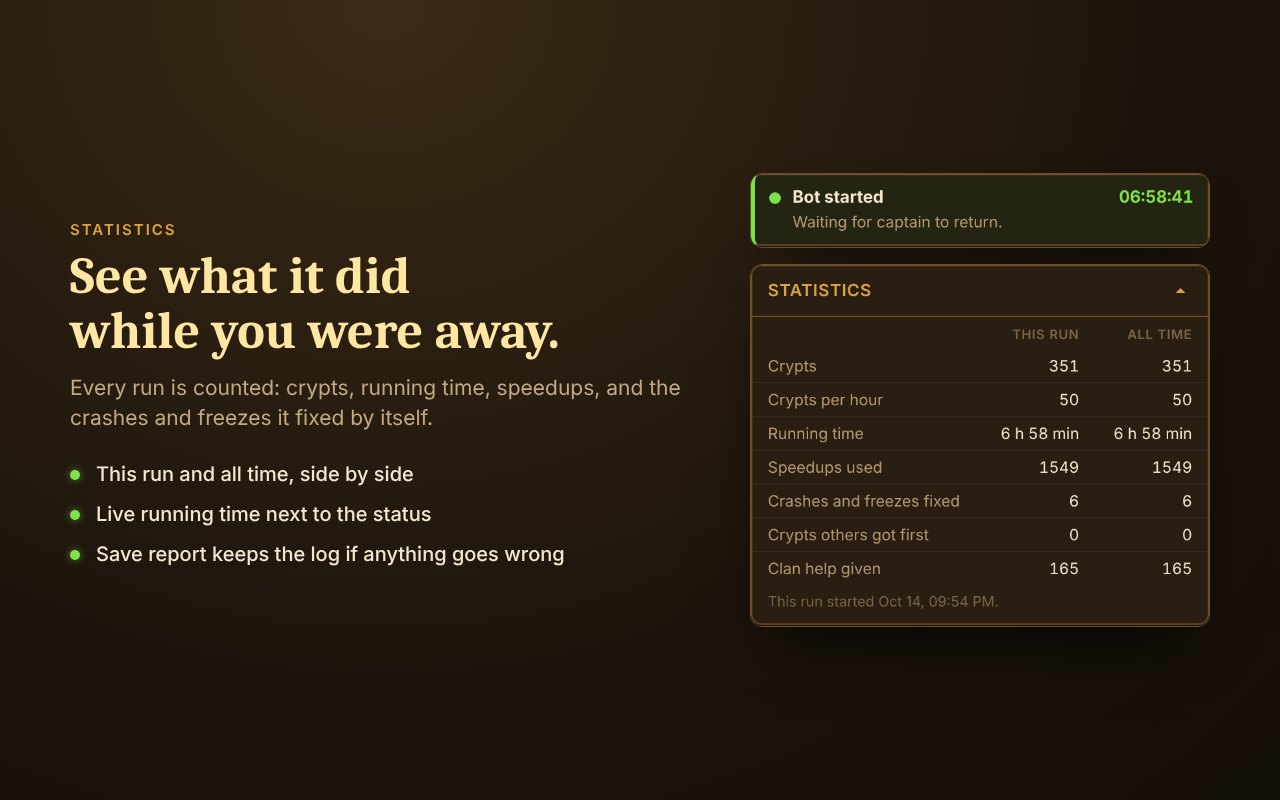
- Statistics for this run and all time: crypts, crypts per hour, running time, speedups and the crashes it fixed by itself.
- Helps your clan
- Presses the clan help button while Carter is out. You can turn it off.
- Carries on after a crash
- When the game crashes or freezes, the bot reloads it, gets past the start-up offers, sets the filter again and keeps going.
- Moves like a person
- Clicks with small pauses and takes short breaks now and then. On slower computers it waits longer instead of clicking ahead of the game.
- Knows when to stop
- Set a number of crypts, or let it run. It stops by itself if the filter can't be set or every crypt it finds is above your level.
Getting started
Install it and open Total Battle in Chrome. Let the game load completely.
Press Prepare game in the side panel. The game reloads in English, in the size the bot works in.
Pick your captains. For 1 Captain, put Carter on the first march slot and remove any other captain. For 3 Captains, select your three crypt captains in the game. Make sure the Watchtower is active. If you are Premium, set the Great Archaeologist title.
Choose the crypt type and levels under Settings. The bot sets the watchtower's filter by itself.
Press Start and leave the game tab open and the computer awake. You can use your computer meanwhile. That's it.
You need Chrome or Microsoft Edge on a computer (Windows or Mac), the browser version of Total Battle and Carter (or three crypt captains for 3 Captains). The free trial needs you to be signed in to your browser (a Google account in Chrome, a Microsoft account in Edge).
New to crypts? The crypt guides cover crypt types, Rare keys, the Watchtower and gearing Carter.
Is it safe?
Here is exactly what it does and doesn't do, so you can decide for yourself.
What it does
- Looks at the game screen and clicks, like you would.
- Uses Chrome's "debugger" feature on the Total Battle tab to click inside the game and see what's on screen. That's what the warning at install is about.
- Works only on totalbattle.com, never in other tabs or sites.
What it doesn't do
- It never asks for your Total Battle password.
- It doesn't change game files or send anything to the game that a normal click wouldn't.
- It doesn't read your chats, mail or anything outside the game screen.
- Screenshots of the game stay on your computer. They are never uploaded.
Bots are against Total Battle's rules, like in most games. The extension waits and moves like a person, but no one can honestly promise you'll never be flagged. Use it at your own risk.
Try it free
1 hour of bot time, no card needed. After that, pick monthly or yearly and cancel any time from the side panel. Payments go through ExtensionPay and Stripe, so your card details are never seen by the developer.
- Monthly
- $4.99 a month
- Yearly
- $26.99 a year
- Under half the monthly price
Kept up to date
Questions
What is auto crypt in Total Battle?
Auto crypting means a tool (an autocrypter, or crypt bot) explores crypts for you: it finds a crypt in the Watchtower, sends a captain, speeds up the march and starts the next one when he's back. TB Crypt Auto-Explorer does this in Chrome, with one captain or three at once, for as long as you let it run.
What is the best crypt bot for Total Battle?
It depends on how you play. TB Crypt Auto-Explorer is built for long runs in Chrome or Edge on Windows or Mac, with one flat price and up to three captains at once. WarForge suits Android players, and Crypt Rider suits Windows players who pay per crypt. See the comparison of Total Battle crypt bots.
Is there a free auto crypt bot for Total Battle?
The first hour is free, with no card needed, so you can see it run on your own account. After that it's $4.99 a month or $26.99 a year. Free crypt scripts shared online tend to stop working when the game updates. Without a bot, the watchtower's crypt filter and 50% march speedups are the fastest way to farm crypts by hand.
Do I need to calibrate it or change my screen settings?
No. There is nothing to calibrate and no separate program to install: you just add the browser extension. Press Prepare game and the bot opens the game in the size it works in, finds the buttons on screen by itself and adjusts to how fast your computer is. Your screen resolution, Windows scaling and other programs stay as they are.
Which crypts can it run?
Common, Rare and Epic crypts, and the event crypts listed under Others, at the levels you choose. Rare crypts are opened with your Dragon Keys. Arenas are not run.
Does it work while I'm away?
Yes, that's the idea. Keep the game tab open and the computer awake. You can even use your computer while it runs: other windows may cover Chrome. Just keep the game as the open tab in its Chrome window.
I play on my phone. Can I still use it?
Yes, most of our players do. The bot runs on your computer in Chrome or Edge, logged in to the same game account. The game only allows one session at a time, so run it while you're not playing on your phone: at night, at work or at school.
Does it work on a Mac?
Yes, it works on both Mac and Windows. It also adjusts its timing to how fast your computer draws the game.
My game is in another language.
Prepare game opens the game in English while the bot runs, because that's what it's tested with. Your own language comes back the next time you open the site normally.
What happens if the game crashes in the night?
The bot reloads the game, closes the start-up offers, goes back to the map, sets the filter again and carries on. If the game keeps crashing, it stops after a few reloads an hour rather than reload forever.
Why do I have to be signed in to my browser for the trial?
The free time is tied to the account you're signed in with (Google in Chrome, Microsoft in Edge), so it isn't reset by reinstalling. Only a scrambled version of the account ID is stored, never your name or email. See the privacy page.
How do I cancel?
Press Manage subscription in the side panel. It opens your subscription page, where you can cancel.
The bot can't find the Watchtower. What do I do?
Total Battle got a new look in the browser in November 2026. From version 2.0.0 the bot works with both the new look and the classic version: press Prepare game and it uses the look the game has loaded. In older versions, Prepare game switches the game to the classic version for you.
Something isn't working.
Ask in our Discord (open a post in #support), or email [email protected]. Press Save report in the side panel's Execution Log and attach the file: it shows exactly what the bot saw, which makes most problems quick to fix.