 TB Crypt Auto-Explorer
All crypt guides →
TB Crypt Auto-Explorer
All crypt guides →
Total Battle Watchtower Guide
The Watchtower is the fastest way to find crypts. Instead of scrolling around the map, it lists the crypts, monsters and mines near your city, nearest first, and takes you to any of them with one tap.
In short
- Open it with the spyglass button on the bottom panel and activate it for 6 hours, 1 day or 30 days.
- It searches the Kingdom your city is in: monster squads, crypts, arenas and mines.
- The Crypts and Arenas tab lists crypts by distance. Filter by rarity and level at the top.
- Go moves the map to the crypt. Tap the crypt to open its card.
Activating the Watchtower
Press the round spyglass button on the bottom panel and choose Activate. You can turn it on for six hours, one day or 30 days. While it's active, the top of the window shows the time left and an Extend button.
The tabs
| Tab | What it lists |
|---|---|
| For the Dragon | Dragon-related targets |
| Monsters | Monster squads near you |
| Crypts and Arenas | Crypts and arenas, nearest first |
| Mines | Resource mines |
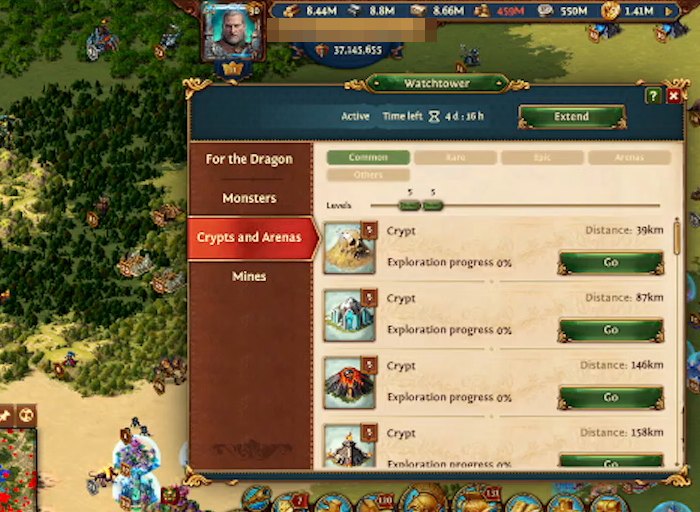
Filtering crypts by type and level
At the top of the Crypts and Arenas tab there are two controls:
- Type buttons: Common, Rare, Epic, Arenas and Others. Turn on the rarities you want and turn the rest off.
- Levels slider: two handles that set the lowest and highest level. Put both on the same number to list only one level.
Set the filter to the level your captain clears in one march (see How to farm crypts faster) and the list shows exactly the crypts worth doing, nearest first.
Reading the list
Each row shows the crypt's picture, its level badge, its exploration progress and its distance. The picture is different for each kind of crypt, so you can spot the one that drops the material you need (see crypt types and their materials). Go moves the map to the crypt, and tapping the crypt opens its card, where you pick a captain and press Explore.
Tips
- Take the top row. It's the nearest, which means the shortest march.
- Other players use the same list. The nearest crypts are often taken while you're on the way. If a crypt is gone when you arrive, take the next row.
- Keep it active. Without the Watchtower you're back to scrolling the map to find crypts.
Let a bot run your crypts
TB Crypt Auto-Explorer is a Chrome extension that runs the crypt loop for you. It sets the Watchtower filter, sends Carter (or three captains at once) to the nearest crypt of the type and level you pick, speeds up the march with your own speedups, and sends him out again the moment he's home. It sets the Watchtower filter for you at the start of every run. It never buys Tar or anything else.
It runs in a side panel next to the game, sets up in a minute, and the first hour is free.
Try it free for 1 hour Watch the 3-minute setupBots are against Total Battle's rules, so using one is at your own risk.
FAQ
How do I activate the Watchtower in Total Battle?
Press the round spyglass button on the bottom panel and choose Activate. You can activate it for six hours, one day or 30 days.
What does the Watchtower show?
Objects in the Kingdom your city is in: monster squads, crypts, arenas and mines, with the nearest first.
How do I find crypts of a certain level?
On the Crypts and Arenas tab, turn on the rarity you want and set both handles of the levels slider to that level.
Why is the crypt gone when I get there?
Another player reached it first. The Watchtower list is the same for everyone nearby, so the closest crypts are popular. Take the next one in the list.